

Hey everyone, Mr. The Plague here from SquidSec. We just shipped a WordPress security plugin you can install, activate, and leave running without a long setup tour.
Today we are announcing SquidShield WP: free, open-source WordPress security from SquidSec. The code is on GitHub at github.com/DotNetRussell/SquidShield-WP. The idea is simple:
One-click security. Free and open source.
SquidShield WP
Why another WordPress security plugin?
WordPress still powers a large share of the public web. Attackers know that. They spray SQLi and XSS at admin-ajax, hammer wp-login.php, scrape usernames from the REST API, drop webshells in uploads, and fingerprint sites from leftover readme.html and plugin license files.
A lot of security suites lean on upsells, cloud lock-in, or dashboards so dense that small teams never finish setup. Others force you to stack half a dozen single-purpose plugins (login lockout, reCAPTCHA, XML-RPC kill switch, fingerprint cleanup) and hope they do not fight each other. SquidShield takes a different route: one-click, secure by default, free and open source under SquidSec. One plugin covers the stack. You can read every rule and signature we ship.
What SquidShield WP does
On activation, it turns on the protection profile most sites need on day one: firewall, login lockouts, scans, hardening, and fingerprint cleanup. The table below calls out the jobs people usually hire separate plugins for, so you know you are not losing fail2ban-style lockouts, login CAPTCHA, automatic readme/license cleanup, or the rest when you consolidate.
| Area | What it does | Replaces |
|---|---|---|
| One-click secure defaults | Activate once and the full protection profile turns on (WooCommerce-aware when needed). First-run scans, FIM baseline, and safe auto-clean start in the background. | Multi-plugin “security suite” setup wizards and long first-run tours. |
| Brute-force lockouts | Failed-login tracking per IP (and optional username), temporary lockouts, audit log events. | fail2ban-style WP login blockers, Limit Login Attempts, “ban after N fails” plugins. |
| Login CAPTCHA | Optional reCAPTCHA v2 or Turnstile on wp-login.php. Imports existing SquidSec / Login No Captcha keys when present. | Standalone login reCAPTCHA / Turnstile plugins (incl. older SquidSec login-recaptcha). |
| Login hardening + 2FA | Generic login errors (no username oracle). Optional custom login slug. TOTP 2FA with backup codes and role enforcement / grace period. | Hide-login-errors tweaks, rename-login plugins, basic 2FA plugins. |
| User enumeration | Blocks REST, author archives, ?author= probes, oEmbed author leaks, and user sitemaps that list account names. | Anti-enumeration plugins and one-off mu-plugin snippets. |
| XML-RPC | Full disable, or pingbacks-only hardening if something still needs XML-RPC. | XML-RPC kill plugins and custom xmlrpc.php blocks. |
| WAF + virtual patches | Blocks SQLi, XSS, RCE, LFI, and bad uploads. Version-aware virtual patches for known plugin CVEs. Custom rules supported. | Lightweight WAF plugins and hand-written request-filter snippets. |
| Rate limits + IP lists | Rate limits on login, admin-ajax, REST, and XML-RPC. Allowlist / blocklist CIDRs. Optional geo-block (off by default). | Request rate-limit plugins, IP ban plugins, basic geo-block tools. |
| Malware + FIM | Signature malware scans (plugins, themes, mu-plugins, uploads) on a schedule. File integrity baselines and hourly change checks. Quarantine / delete helpers from the UI. | Standalone malware scanners and basic file-change monitors. |
| Vulns + misconfig | Plugin risk scoring against bundled vuln data. Misconfiguration checks (file editor, debug flags, and similar). | Entry-level vulnerability scanners and security audit checklists. |
| Sensitive files + uploads | Finds and can quarantine junk like config backups and dumps. Blocks direct hits on sensitive paths. Best-effort PHP-in-uploads hardening via .htaccess. | Sensitive-file scanners and uploads hardening snippets. |
| Fingerprint cleanup | Automatically deletes public readme, license, and changelog fingerprint files from core, plugins, and themes. Runs on Shield install, after plugin/theme/core updates, on plugin activate, and after theme switch so new packages cannot re-leak versions. | Manual “delete readme.html” cleanups and one-shot fingerprint plugins that do not re-run on updates. |
| Admin hardening | Disables theme/plugin file editor, strips WP version noise / generator tags, security headers, restricts application passwords for non-admins. Optional open-registration block. | Hardening mu-plugins and security-header plugins. |
| Anomaly detection | Watches for odd request patterns beyond single WAF signatures. | Bolt-on anomaly / behavior modules in heavier suites. |
| Alerts + daily report | Email, webhook, and Slack alerts on security events. Optional daily digest. Full audit log (logins, plugin/theme changes, blocks). | Separate alert/log plugins glued onto a security stack. |
| Visibility + API | Plain-language protection dashboard, WordPress admin dashboard card, REST API for operators, pentest mode (log only, do not block) when you are testing. | Opaque “security suite” dashboards and ad-hoc operator APIs. |
That fingerprint cleanup is easy to miss and easy to undervalue: every plugin or theme update that ships a public readme.txt or license.txt can advertise exact versions to scanners. Shield removes those leak files again after the upgrade finishes, not just once on install.
You do not have to keep a separate fail2ban-for-WordPress plugin, a login CAPTCHA plugin, a readme cleaner, and a hardening mu-plugin running next to Shield for those jobs. If an older SquidSec helper plugin overlapped, deactivate it after Shield is on so only one stack owns login challenges and lockouts.
Inside the admin UI
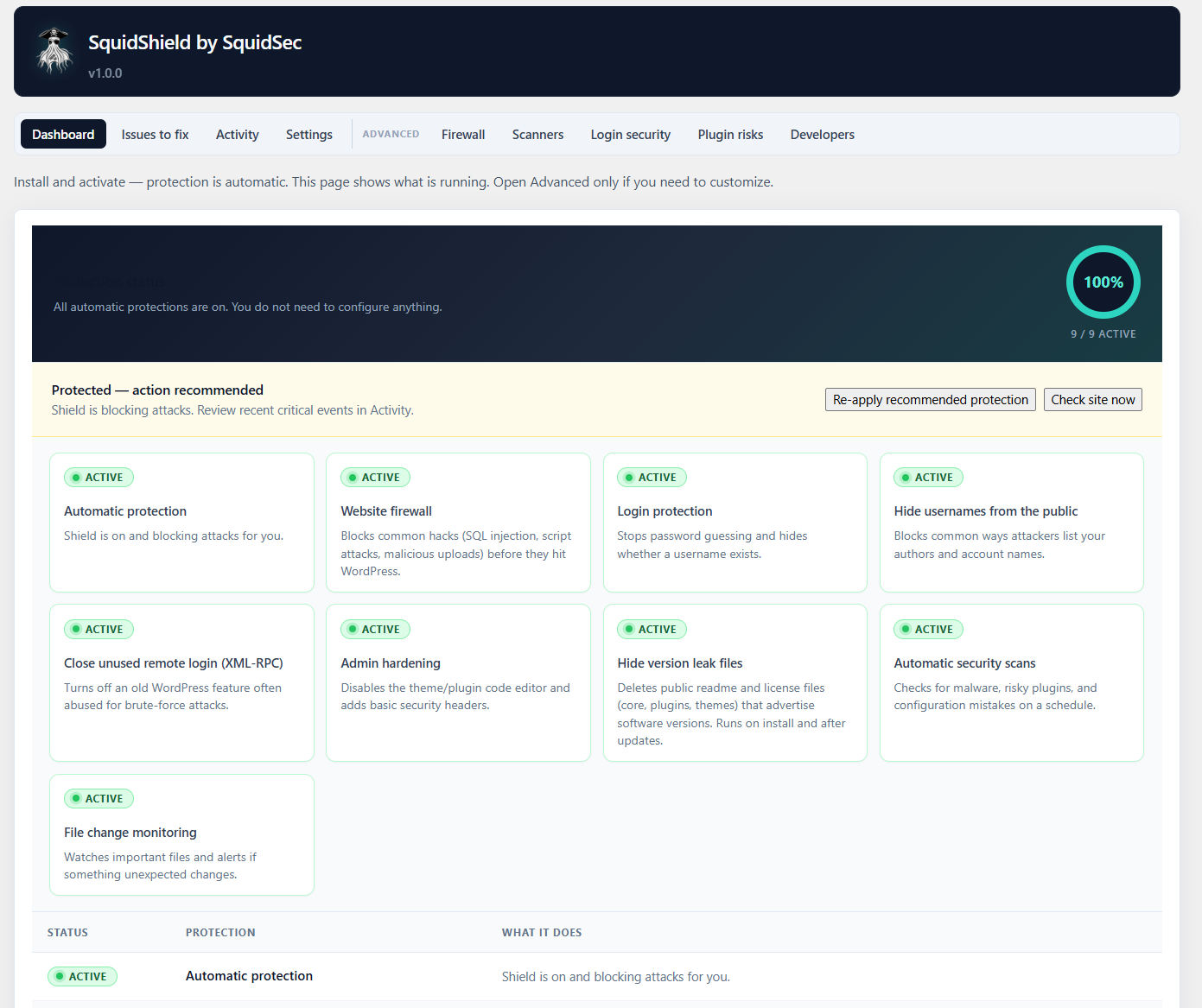
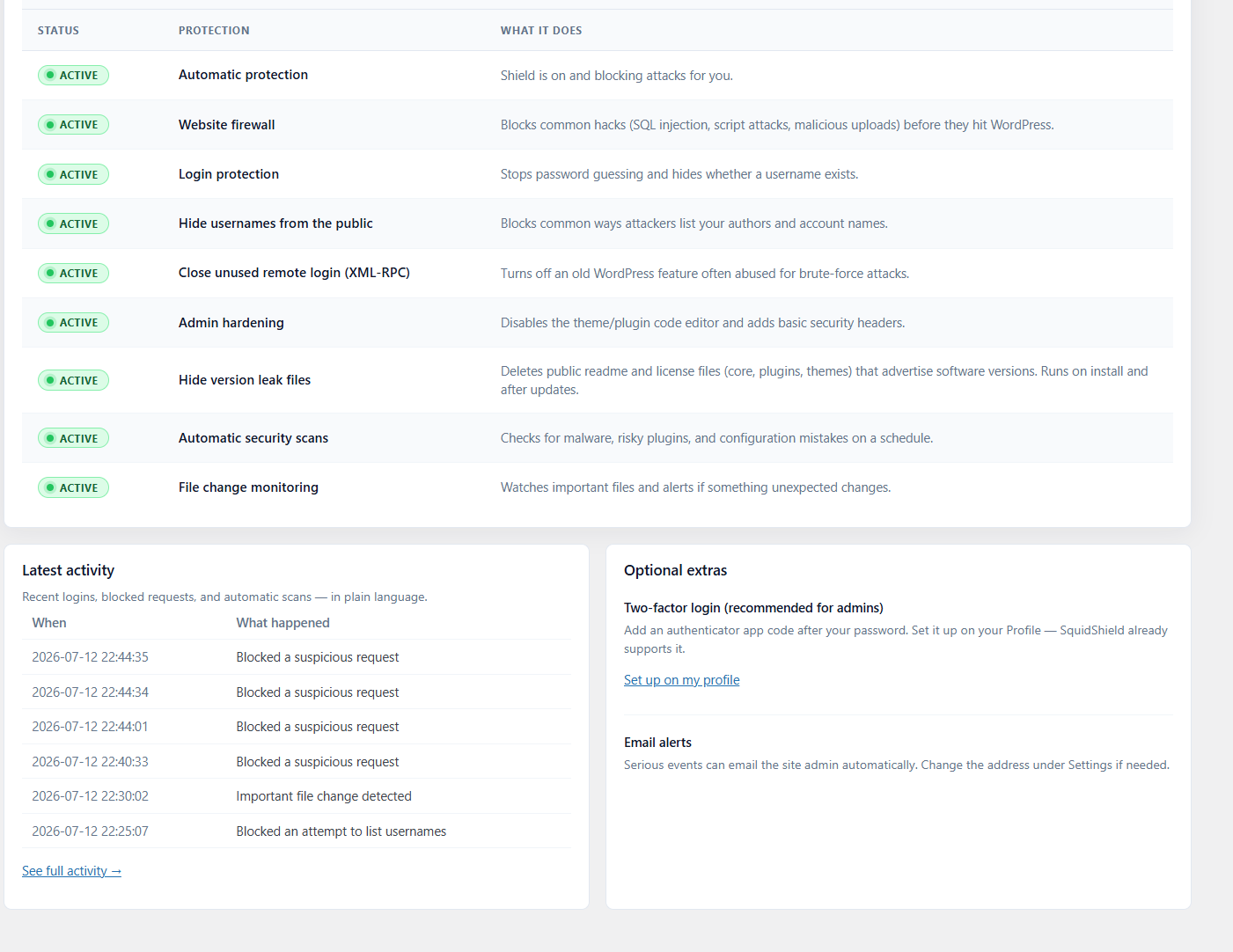
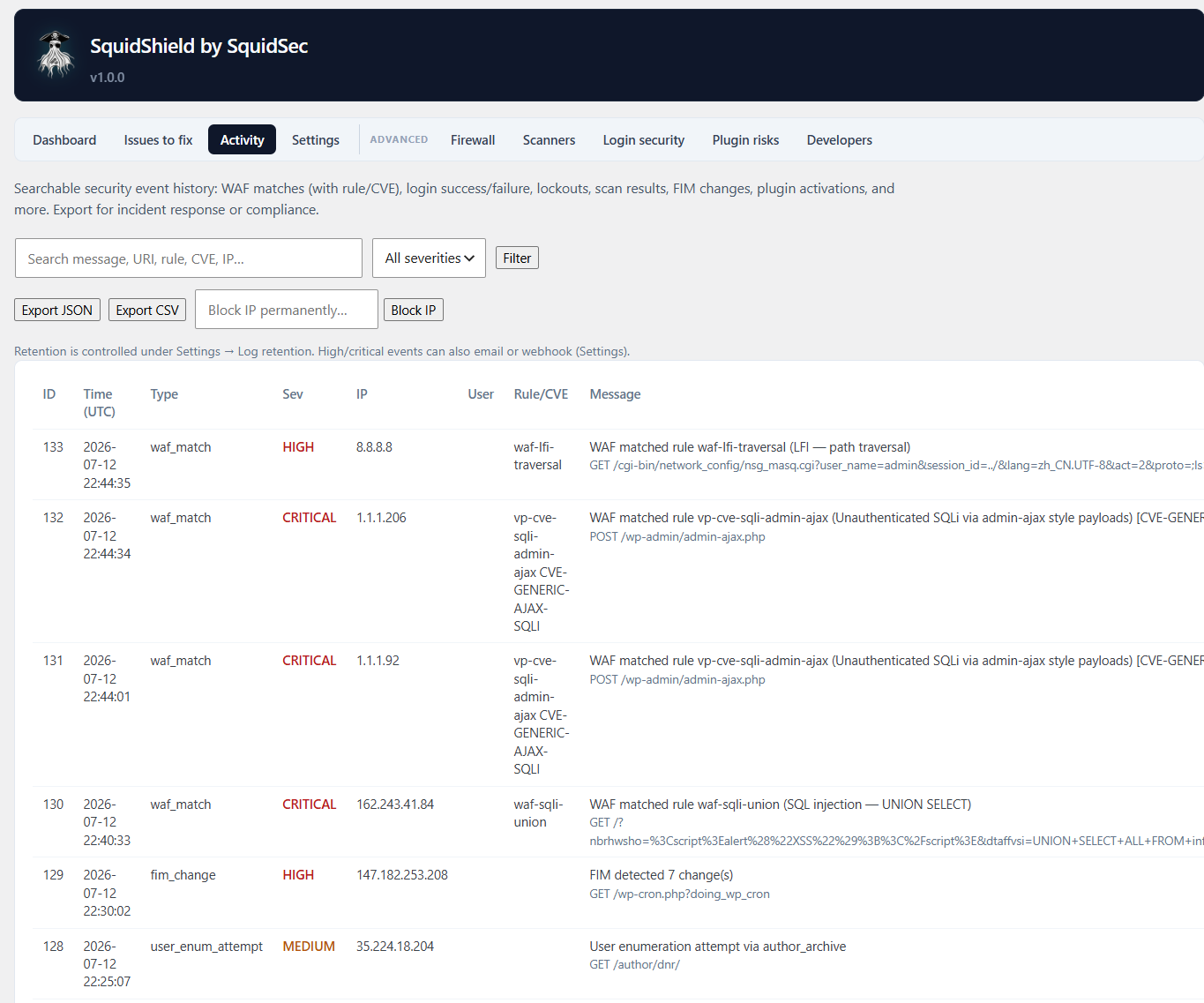
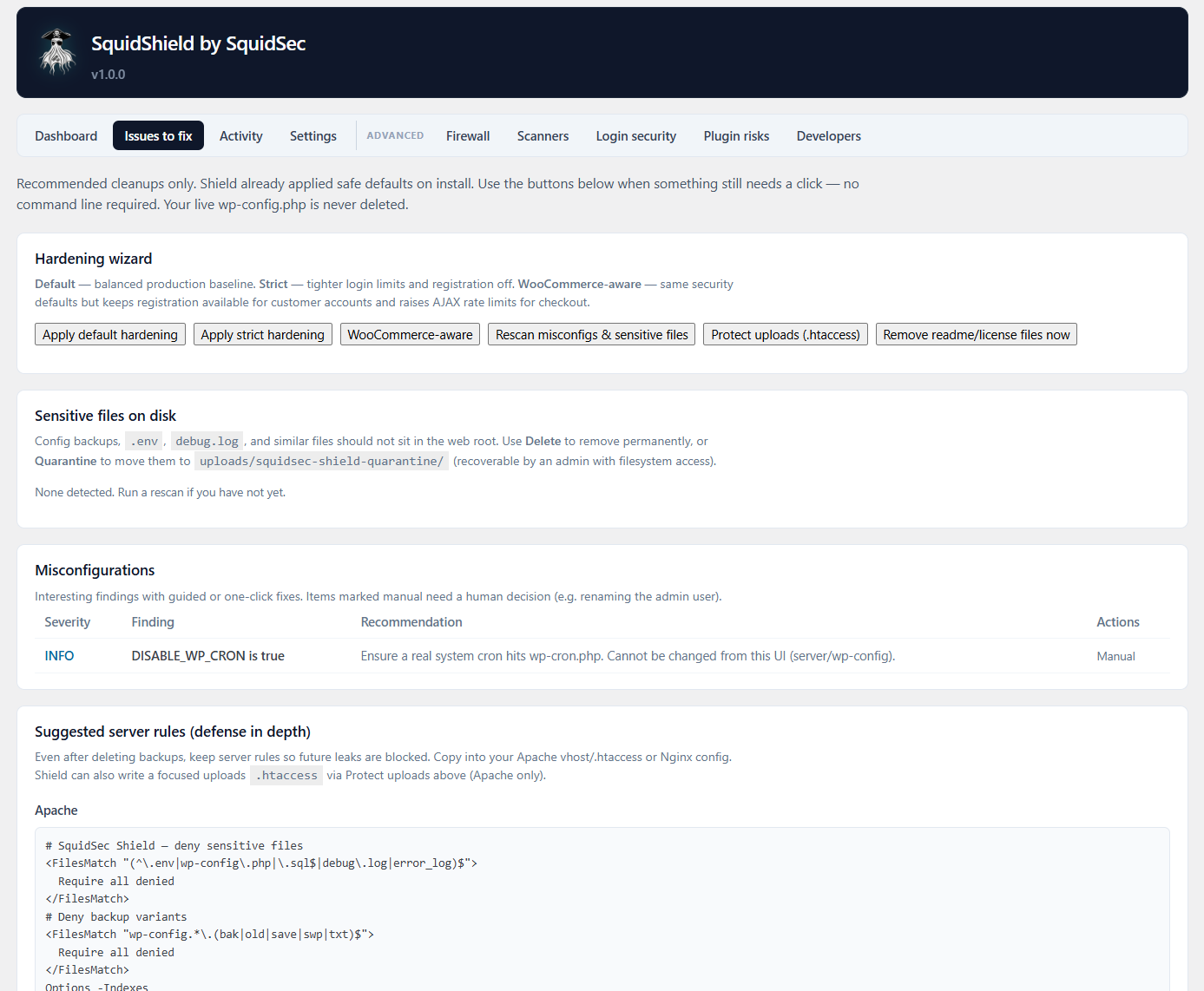
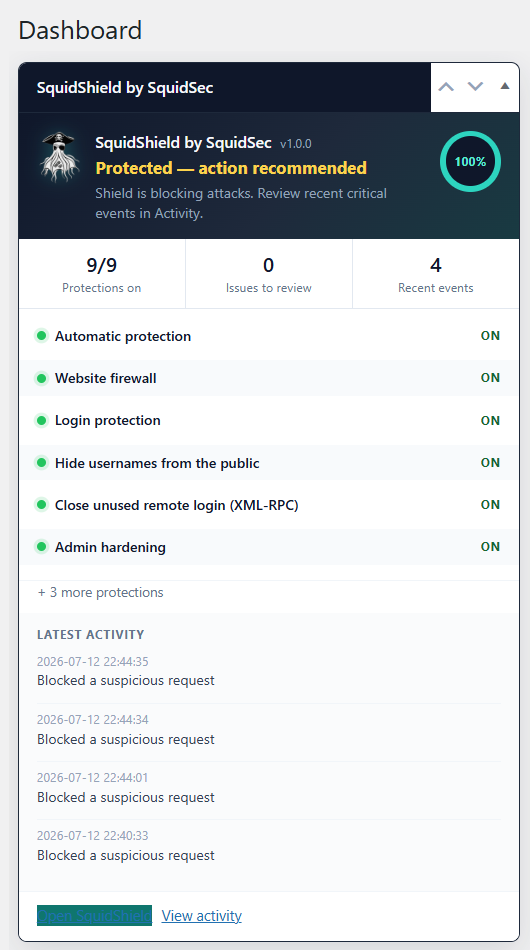
Here is what operators actually see after activate. No setup tour. Protection status first, advanced tools when you need them.
Built for real operators
The admin UI leads with plain-language protection status: what is active, what needs a click, and recent activity in normal English instead of raw rule IDs. Advanced screens for firewall rules, scanners, 2FA, and the API are still there when you need them. They just are not in your face on day one.
That is what agencies, freelancers, and solo operators usually need: WordPress hardened Monday morning, not after a setup webinar.
How to install SquidShield WP
From the GitHub release (recommended)
- Open the latest release.
- Under Assets, download
squidsec-shield-x.y.z.zip(the plugin package, not the Source code archive). - In WordPress: Plugins, Add New, Upload Plugin.
- Install, then Activate.
Tip: Uploading the raw Source code zip or a nested zip often causes “The plugin does not have a valid header.” Use the release asset built for WordPress.
From the repository
git clone https://github.com/DotNetRussell/SquidShield-WP.git
cd SquidShield-WP
chmod +x bin/build-release-zip.sh
./bin/build-release-zip.sh
# Upload dist/squidsec-shield-<version>.zip in WP Admin
Requirements
- WordPress 5.8+
- PHP 7.4+
- MySQL or MariaDB as required by your WordPress install
Free, open source, and owned by SquidSec
SquidShield WP is free software under a GPL-compatible license. Rules, virtual patches, and malware signatures ship as JSON you can read and extend. You do not need a commercial scanner license or a paid SaaS WAF to turn baseline protection on.
Star the repo, file issues, and send pull requests if you want to contribute community rules or signatures:
https://github.com/DotNetRussell/SquidShield-WP
What is next
We will keep working on low false-positive WAF rules, signature coverage, and the set-and-forget dashboard. If you run SquidShield on a real site, tell us what blocked cleanly, what still felt too technical, and what broke. That is what drives the roadmap.
Patch your stack, turn on the shield, and stop leaving the front door open because the security plugin needed a sales call first.
Mr. The Plague / SquidSec